
Good interiors hide a lot of machinery. Handleless kitchens conceal the bins, wall panels conceal the wiring, and a robot vacuum slips under the sofa to keep pale floors looking effortless. It works until the day it does not, when a machine you never needed to think about starts stopping in the middle of the rug.
A worn robot vacuum battery is a small problem with a low-cost fix, yet the design of a home affects it more than most owners realise. Where the dock sits, how warm that spot gets, and how the floors are laid out all change how long a pack lasts. This guide covers how to choose a replacement and how to plan around the robot so that its next pack lives longer.
Where a dock should go in a considered room
Designers often tuck the dock into a cupboard or behind a radiator cover, because nobody wants a charging station on show. That choice can cost you battery life. Heat builds quickly in an enclosed joinery space, a robot may fail to find its way back, and a tight spot makes it hard to wipe the contacts.
Default to an open wall on a hard floor, with clear space on each side of the dock. If it has to be hidden, build a low open-fronted recess with ventilation at the back, well away from underfloor heating manifolds and hot pipes. A shallow plinth cut-out beneath a run of kitchen units can work well, as long as the robot has a straight approach.
Where it stops: makers differ on the clearance they ask for. Check your manual before committing to built-in joinery, since a recess that blocks the dock’s signal defeats the whole idea.
What heat does to a robot vacuum battery
Warmth and a constant full charge are the two things lithium cells like least, and a dock delivers the second by design. Battery University’s table shows cells kept at 25°C holding 80% of capacity after a year at full charge, falling to 65% at 40°C. Cells stored at 40% charge fare better, at 96% and 85%. A dock in a sunny bay window pushes a pack toward the worse end.
In other words, the hot conservatory is a poor place for the charging base, however tidy it looks. Move the dock to the coolest practical wall. If the house will be empty for a long stretch, take the robot off charge and leave it at around half.
Where it stops: those figures describe cells in storage, not robot vacuums in daily use. They show which way things move, not how long your own pack will last.
Reading the label on a Eufy RoboVac battery
Slim robots are popular in homes with low furniture, and many older Eufy models fit that description. Battery retailer Accessories-Mall describes the pack used by a large group of them: the PA04 replacement battery is rated at 14.4V and 2600mAh, or 37.44Wh, and these packs use a 3-prong connector. Look for those details on your old pack before buying a replacement.
Appearance will not settle it, since a similar appearance does not guarantee compatibility. A robot sold under the same family name in another year may use another pack, so read the code printed on the battery itself. Take a photo before you remove it, because the plug orientation is also worth having on record.
Where it stops: hybrid mop models often have different packs, and some use larger batteries entirely. Never assume a family name covers every model.
Comparing Roomba packs if you own a mix of machines
Homes with several floors often end up with different brands, and spares do not cross between them. For the iRobot range, the same seller lists the s9 family on its own, since the premium s9 series uses a unique battery — the ABL-B — while its ABL-D2 standard pack holds 32Wh. Keep a short written list of which robot takes which battery, ideally inside a cupboard door near the dock.
Buying a second robot of the same model has one small benefit that often gets overlooked: their batteries can be swapped between floors, which makes a failing pack very easy to confirm.
Floors, rugs and how they change runtime
Interior choices have direct consequences for the battery. A deep wool rug can double the effort the motors have to make compared with polished concrete, and a robot climbing repeatedly over a thick edge burns energy with every attempt. Long open-plan rooms add travel time. Dark floors can confuse the cliff sensors on some machines, too, which leads to hesitation and wasted runs.
Three small changes usually help more than a bigger pack. Use rug grips or low-profile edges, so the robot crosses without a struggle. Set no-go zones around heavy fringes and thick shag pile. Then schedule rooms separately, instead of asking one charge to cover the whole house at top suction.
Where it stops: scheduling cannot rescue a pack that has already lost much of its capacity. If a single room now takes the whole charge, it is time to replace the battery.
Is it really worn, or just a dirty contact?
Start simple. The seller’s Eufy page lists shorter running time and a robot that stops sooner after charging as common signs, then adds that these symptoms can also result from charging problems, dirty charging contacts or other faults. In a home with pale carpets and pets, fine fluff collects on those metal strips quicker than you might guess. A dry cloth costs nothing.
Once they are clean, charge the robot fully and time one run in a single room. That figure becomes your baseline, and any later comparison will be far more useful than a vague memory of how it used to perform.
Ordering and fitting in the UK
Plan ahead. Specialist sellers often ship from overseas; the Accessories-Mall shipping table lists United Kingdom orders as coming from its China warehouse in 7–15 business days. Order when you first notice shorter runs, so you are not left with an idle robot and dusty floors while you wait.
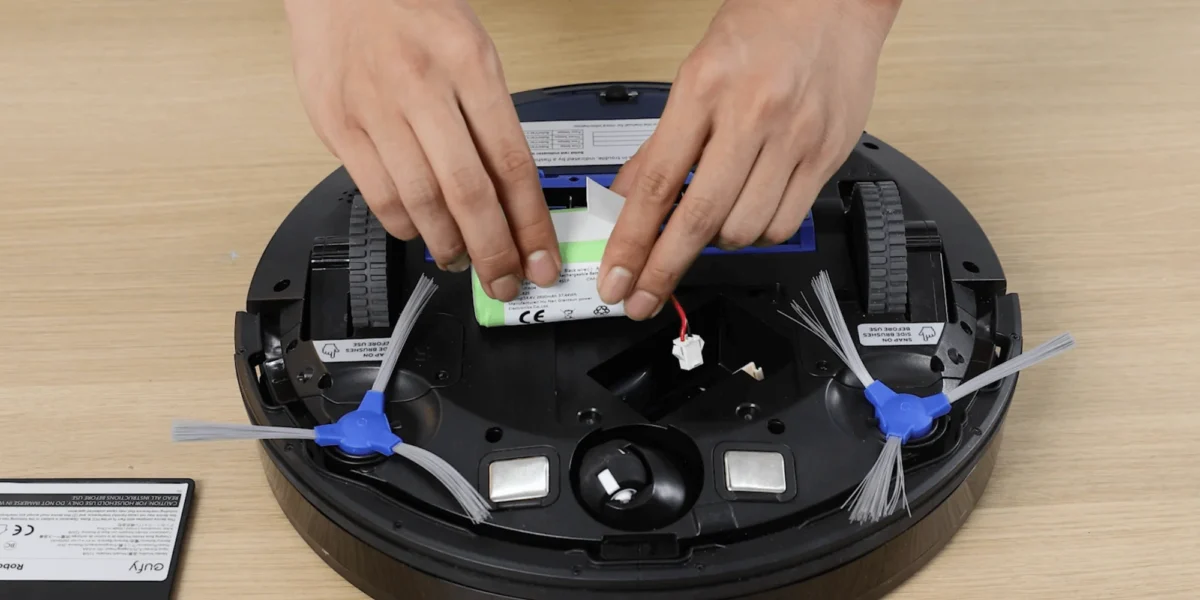
Fitting is straightforward on most models. Lay the robot on a towel to protect its lid, undo the small screws on the battery door, unplug the old pack by its plastic housing, and connect the new one. Then give it a complete charge on the dock before you run it. Do not put the old pack in a household bin. Tape the contacts and take it to a recycling centre or a shop with a battery collection point.
Start with what is printed on the old pack, and photograph it. Specialists such as Accessories-Mall list robot vacuum packs by model and part number and will check a photo before you order, which saves opening up the robot a second time.
